.png)
Build the TargetLens™ your target actually needs
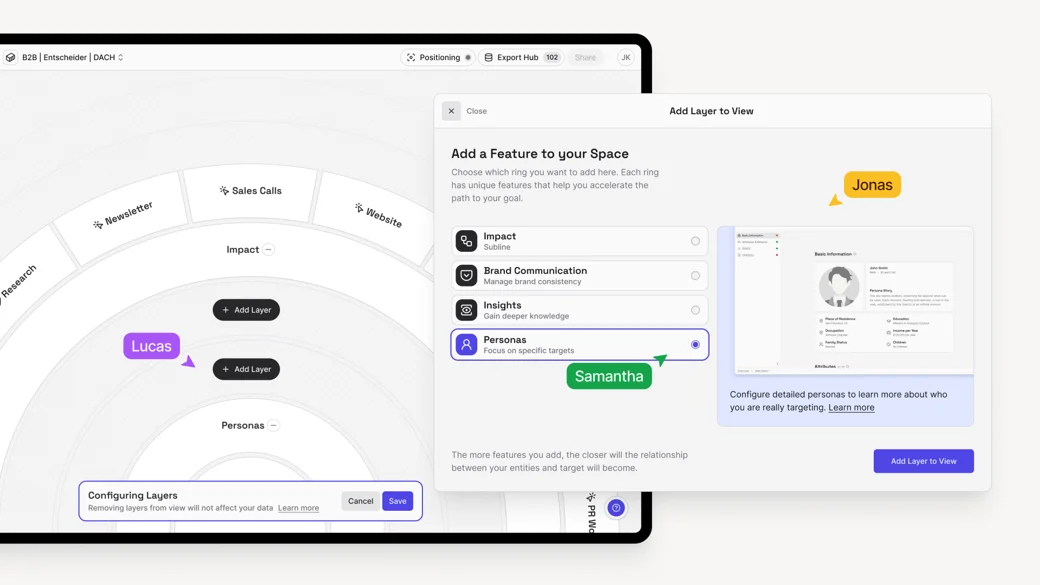
With the new TargetLens™ configuration, you build each Lens exactly around what it takes to achieve your specific target. A Go-to-Market Lens looks different from a Sales or Stakeholder Lens – so now each role or department sees exactly the contributions and influencing factors relevant to their decisions. Nothing more. Nothing less.
Every Ring Module serves a specific strategic purpose. Combine only the ones that matter for this target.
Nest TargetLenses to make strategic dependencies visible
Goals don't exist in isolation. You can now link TargetLenses directly to each other to visualize their strategic relationships and dependecies. A goal in one TargetLens™ can be a tangible contribution in another. You always know how your goals relate to each other – and move between them without losing context.
.webp)
Inverted KPIs – because less is sometimes more
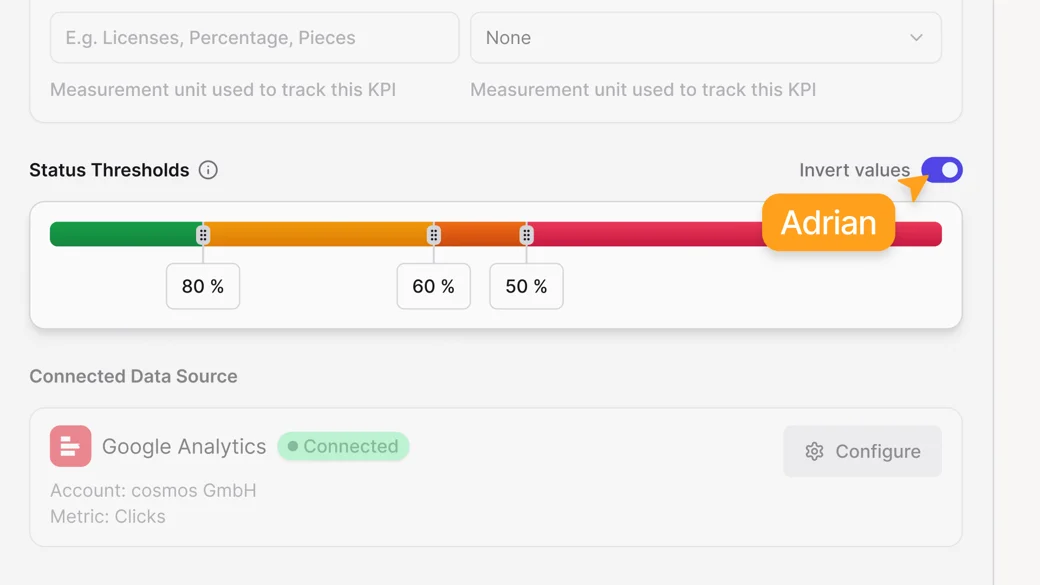
Not every KPI should go up. Costs, error rates, churn – for these metrics, a lower value is the goal. With Inverted KPIs, you can now model exactly that: click "Invert Value" in the edit mode of your KPI, set the target you want to stay below, and cosmos™ evaluates progress accordingly.